It's (WITH-ken)
Wythken Printing works with RVA professionals across all industries who need reliable printing for their business or personal projects. Our range of technologies includes digital printing, offset printing, direct mail, and vinyl signage. The only problem you'll have is how to pronounce it.
Frequently Asked Questions
Custom Quotes Questions
- How long does it take to receive a custom quote?
- How long are your estimates valid for?
- Can't I just email you all the information instead of using a custom quote form?
Printing Questions
- Will you send me a proof before the printing is started?
- Can I print with PMS (Pantone Matching System) or other special inks?
Files Question
- What file formats do you require? How do I set up my files correctly?
- What are crop marks?
- Do I have to draw crop marks manually?
- What is bleed?
- Should I convert my files into CMYK?
- What resolution should I use for the images in my artwork?
Security & Privacy Questions
Custom Quote Questions
How long does it take to receive a custom quote?
This depends on the complexity of your quote request. The vast majority of our estimates are done within 24 hours.
How long are your estimates valid for?
Estimates expire after 30 days. The estimate will be available on our website for that period of time and it will be removed after it expires. After that period we'll have to re-do the estimate.
Can't I just email you all the information instead of using a custom quote form?
Yes, you can. However, we will respond much faster if you fill out the custom quote form. This form contains all the information we need to complete the estimate. If you send us an email, there is a chance that you might forget a piece of information that is necessary to complete the estimate.
Will you send me a proof before the printing is started?
Yes, if you order one. We can provide you with a soft proof or hard proof for color critical jobs. The soft proof will be sent via email. For color critical orders, we recommend requesting a hard proof, which is shipped to you via overnight mail.
Can I print with PMS (Pantone Matching System) or other special inks?
Yes, however, in order to reduce wash ups and VOCs, we prefer printing with process inks.
Files Questions
What file formats do you require? How do I set up my files correctly?
We need a 1-up, press-ready PDF file with crop marks and bleed. Please see the "Preparing PDF Files" section of this web page for information about creating press-ready PDFs.
What are crop marks?
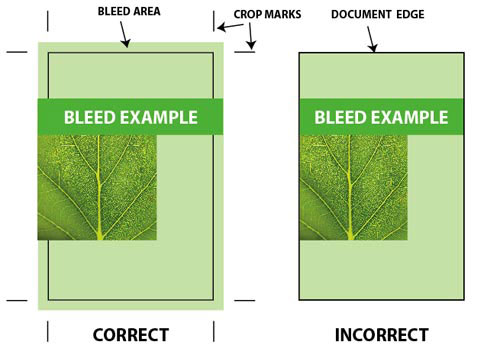
Crop marks are printed or drawn lines indicating where the paper should be cut to produce the correct page size.
Do I have to draw crop marks manually?
No. Any desktop publishing software can create crop marks automatically when you export your file into a PDF. In this case, you have to make sure that the trim size is the same as your document size. For example, if the final trimmed size of your business card is 3.5" x 2" then your document size must be the same.
What is bleed?
If any element on your document layout makes contact with the document border you will have to use bleed. The trick is to place the element so that it goes over the border where the document will be cropped after printing.
The term bleed is used for all objects overlapping the border of your document.
Should I convert my files into CMYK?
No. Conversion from RGB to CMYK is done automatically on our workflow.
What resolution should I use for the images in my artwork?
We recommend that all images be saved at 300 dpi.
Security & Privacy Questions
Do you keep credit card information on file?
No. For your security, we don't keep any credit card information on file.
Is your website secure?
Yes. Our secure checkout system uses the latest secure server technology. Your order is submitted and retrieved with a secure connection to our server and remains secure at all times.
Will you share my information?
Absolutely not. We keep all customer information internal. Occasionally, you may receive offers and announcements from Wythken Printing via e-mail. You may unsubscribe from these messages at any time.
Site-Related Questions
What browsers work the best with your site?
Our site should work with all browsers, however, we recommend the latest version of Microsoft Edge, or Google Chrome for Windows and Firefox for Mac.
